Memoirs of a guy who spent too much time cleaning other people’s shit and paying for their bad decisions, episode #too many.
Copy/paste history and styles are core features in Ansel, and the one that makes it deserve (or not) its “workflow app” title. But it is also among the hardest to get right internally. Users see a list of edits, but under the hood those edits depend on the pipeline order, module instances, and masks. If two images have different pipeline topologies, naïvely copying edits can produce inconsistencies.
This update makes history merging robust, consistent, and transparent, after tedious work of code cleaning and simplification. It also introduces clear error handling when a perfect merge is mathematically impossible.
Una breve historia de mal diseño
Until early 2019, Darktable was designed around a fixed pipeline: modules had an ordering that was decided at compilation time by a Python script , created by Darktable’s founder, Johannes Hanika in 2011 . The one thing you can expect from Jo is to get his math right, and so this script does exactly what should be done in such circumstances:
- let programmers declare modules,
- let them define which modules should go before each module, in a lazy and convenient way that allows to just say “A should be before C”, “B should be before A”, “D should be before A”, etc.
- turn that into a directed graph , which is just the math object glueing all those constraints together,
- solve the directed graph with one of the topological sorting algorithms, which date back from the 1960’s,
- write the index number of each module in the pipeline, and done.
Unfortunately, that fixed pipeline meant that changing the relative ordering of modules anytime later would break older histories. Which sucked because some design mistakes were made with the position of the display transform and the base curve module, which happened early in the pipeline and made colors go bonkers in HDR situations. To fix that, I had to create the filmic module as another module, in order to be able to put it at the end of the pipeline. And all other display-referred modules would have needed to be duplicated in the code base to be able to insert them where needed without breaking older edits (including mine). Needless to say, the fixed pipeline had had its run, and I was a proponent of this change.
With a fixed pipeline, merging histories together, that is copying/pasting histories between images or applying styles to images (which ends up being the same thing), was easy: it was just a matter of replacing modules parameters and masks 1:1. Even with multi-instances modules, which had been introduced circa 2014, it wasn’t that bad because all instances were forced to be consecutive, and numbered relatively to each other. So, after creating the missing instances, at a position that was predictable and invariant (in sequential order after the base instance), it was still replacing modules parameters and masks 1:1.
But the much-needed pipeline re-ordering feature, at runtime and by users, that arrived with Darktable 3.0 was done in the worst possible way. The developer who implemented it handled indexing with arrays of floating point priorities, which is not the right data structure for the problem. Plus, the history management code wasn’t refactored and simplified prior to extension, but hacked in place with minimal changes, which made it really complex and obfuscated. Pascal Obry, who had accepted the change in 2019, had to rewrite the whole pipeline reordering backend in 2020, using the proper data structure for the task at hand (linked lists ), because the previous one was brittle and unmaintainable.
But merging pipelines, which may have different numbers of modules, ordered at unpredictable and non-invariant places, cannot be done any other way than using topological sorting at runtime, because it’s not a mere problem of histories (aka module parameters snapshots) anymore, it’s a twofold problem that includes histories but also pipeline topology. In other words : we need to solve where to insert module instances that exist in the source pipeline but not in the destination. And yet, the Python script doing that at compilation time was deleted in 2019, and the feature was never ported to C.
So, the way Darktable, to this day, handles pipeline merging is through heuristics hacked from the fixed-pipeline paradigm and broken in general, except in the nice cases that match the conditions of 2018’s pipelines and earlier:
- if your source and destination pipelines have the same number of modules ordered the same way, everything goes well.
- if your source pipeline has additional module instances, compared to the destination, but those instances are all sittings immediately after the base instance, everything still goes well,
- but… if you have additional instances, whether in the source or in the destination pipeline, and they have been moved away in the pipeline, then the behaviour is unspecified, unpredictable, and I have been copy-pasting history holding my breath for more than 5 years,
- also, there is a list of “fence” modules that need a specific relative order (like color calibration absolutely needs to go after input color profile), but no way to enforce them, no way to fix them when bad orderings happen, only silent error messages in console.
Combine that with raster masks, where the module reusing a raster mask absolutely needs to sit later in the pipe than the module producing it, and where, by the way, you may want to copy the producer along with the consumer, or at least get a warning if you don’t… and you get the recipe for madness.
In practice, you will need to open each image and check the module stack in darkroom, which is painstakingly slow.
Because Darktable is defined by bad priority management, a lot of cosmetics have received a lot of work : it will let you edit your pictures with PlayStation gamepads, it’s about to get deep-learning masking features, but it still manages to fuck up the core basics, with no improvement in 6 years despite the apparent activity in the project.
The issue (TL;DR)
Previously, history paste tried to merge modules one by one as it went. That worked in simple cases but became unreliable when:
- the source image had a different pipeline order,
- there were multiple instances of the same module,
- or masks and blending were involved.
Because the merge was not solving the whole ordering problem, the result could depend on a lot of things. In some cases, the final pipeline could end up inconsistent with the history stack.
The fix
I implemented a topological sorting algorithm in C. Or more accurately, ChatGPT did and I checked it (more on that below). 304 lines of code, which, for C, is very few.
We now treat the pipeline order as a set of constraints that must be solved globally, not module‑by‑module. In practice, this means:
- We solve the pipeline topology first, and the development history (module parameters) last. Two clear steps that makes error handling possible.
- The merge computes a single, valid pipeline order that satisfies both the source and destination whenever possible, no matter how many module instances and how they are ordered.
- If constraints are incompatible, Ansel can explain the conflict and ask which ordering to preserve.
- If a conflict is unsolvable, Ansel reports it clearly instead of producing a broken or unstable pipeline and give you options to fix it.
- Constraints are put on modules using and consuming raster masks too, and a warning is issued if a raster mask user is copied without the producer.
- Hard-coded constraints are put on modules that require each other before, for technical reasons (highlights reconstruction before demosaicing, input color profile before color calibration, etc.). Those constraints are handled the same as others and solved together (no special case).
Regarding the second part, the history properly speaking, one thing needs to be clarified here. Darktable and Ansel history is much like an undo/redo list of module’s parameters snapshots : each history item is linked to a module, and represents its iternal state of parameters and masks. When loading the history into the pipeline nodes (nodes being the pixel filters attached to the “modules” you see in GUI), we read history bottom to top and copy each item/snapshot into modules, meaning that later snapshots always override earlier.
That is to say, history is ordered by time of user modification (again… think undo/redo list of snapshots), not by pipeline nodes order. But, where it gets confusing is, history items also store the pipeline position of a module, which means module reordering leaves history items. That confused Darktable developers, and much more users. So, let us conceptually split both, both in our minds and in the software.
Topology (pipeline nodes ordering) is independent from history. Unlike Darktable, which manages everything through history items (including pipeline order), which is actively harmful in terms of both understanding and code complexity (these go together anyway), we solve the pipeline as a standalone collection of nodes (modules), and then rematch nodes with their last history stage. It took me a couple of years to see through all the overwhelming obfuscation going on in this software, buried in copy-pasted code, and see the light: once abstracted, the problem is pretty easy.
So, once topology is solved, that leaves us with 3 history merging mode :
- replace : source history replaces the entire destination, mandatory modules like demosaicing for RAW images might still get added on top (so that makes copy-pasting safe across JPEG and RAW). This mode leads to no topological sorting, it’s a direct copy of history and pipeline order.
- append : source history goes on top of the destination, so history items that target the same modules in source and destination get overridden by the source,
- appstart : source history goes at the bottom of the destination, so history items that target the same modules in source and destination get overridden by the destination.
The pipeline order solved by topological sorting is updated in the last history items, both in append and appstart modes, meaning that going back in history will also revert the topological sorting. Histories are not compressed on purpose, when merging, so users retain the ability to revert the merge both using undo/redo features, or by going back in the history toolbox, in darkroom, before the point of merging.
In short: history paste is now deterministic, safe, non-destructive, even for complex edits.
How to use
There will be one source history (that you copy), and one destination history (where you paste). The same will be applied with styles when they get reimplemented; the source history will be defined by the style instead of another image, and the rest will be the same.
In the global menu Edit → History pasting mode, you get to choose between append, appstart or replace. The setting is global across the whole application. That determines what history (source or destination) takes precedence by overriding common modules.
In Edit → Nodes pasting mode, you get to toggle on/off Copy module order. If off, the pipeline order of the destination is kept as-is. If on, we try our best to import the source pipeline order into the destination.
As before, in Edit menu, you get the options to copy/paste everything, or only selected modules (through the modal window). Global shortcuts are available and user-editable. Note that copy-pasting histories is explicitly forbidden in darkroom view, even from the filmstrip, because it is ambiguous to determine whether you want to copy between thumbnails, from thumbnail to main image or the other way around. In lighttable, you select the source, copy, select the destination, paste, and everything is clear.
Now, there is an important assumption to have in mind : modules that have the same instance name (instance number by default, or user-defined name) are considered to be the same entity on destination and source histories. So, every Exposure (sky) will be merged with every other Exposure (sky) module (case-sensitive), and there should be only one Exposure (sky) instance in destination and source histories. Previously, the code used instance numbers, which is more brittle because they are imposed by the software and incremented in the order of creation, which has no meaning for users.
GUI and error handling
The beauty of the new solution is that you don’t have to open the darkroom to see the mess you created by copy-pasting garbage; you can review it before any harm is done to your edits, in lighttable. Also, when the solver fails to find a solution, which happens with incompatible constraints (A should be preceded by B, but B should be preceded by A) or cycles (more below), it is able to tell what fails, report it, and either request user input to fix it or fallback to the sanest path. Let me show you:
Trivial cycles
Exposure 1 is before Exposure in source history, but after in destination history. The set of constraints ends up with Exposure → Exposure 1 → Exposure, which is unfeasible. Here is what happens in Ansel :
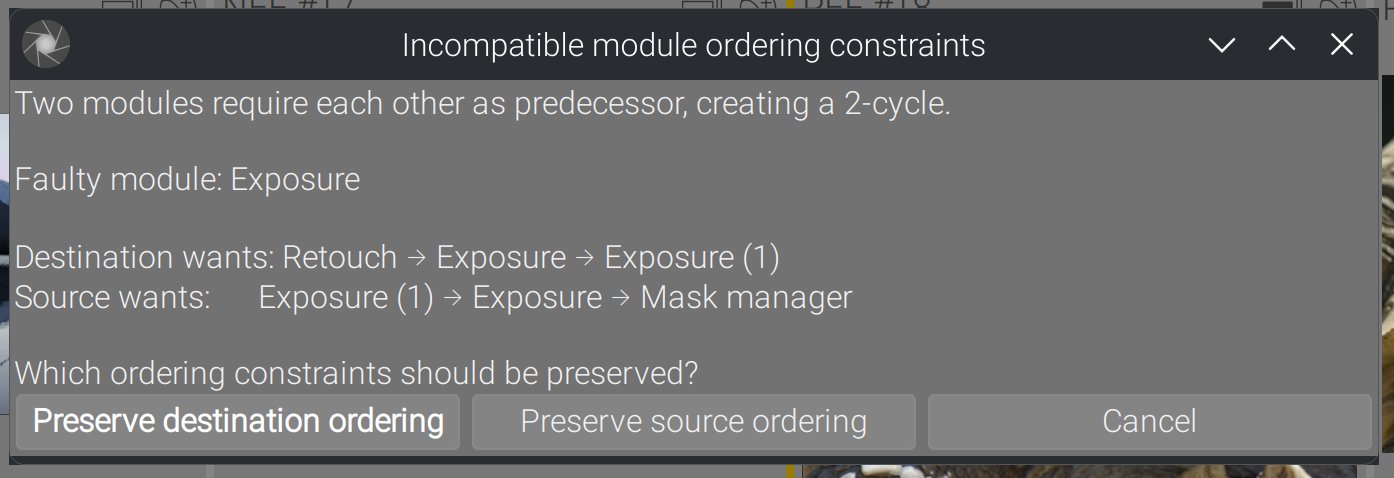
These trivial cycles involving immediate neighbours are caught before solving, so they don’t interrupt the control flow.
Non-trivial cycles
Those non-trivial cycles involve several modules and cannot be detected before attempting to solve the directed graph. When that happens :
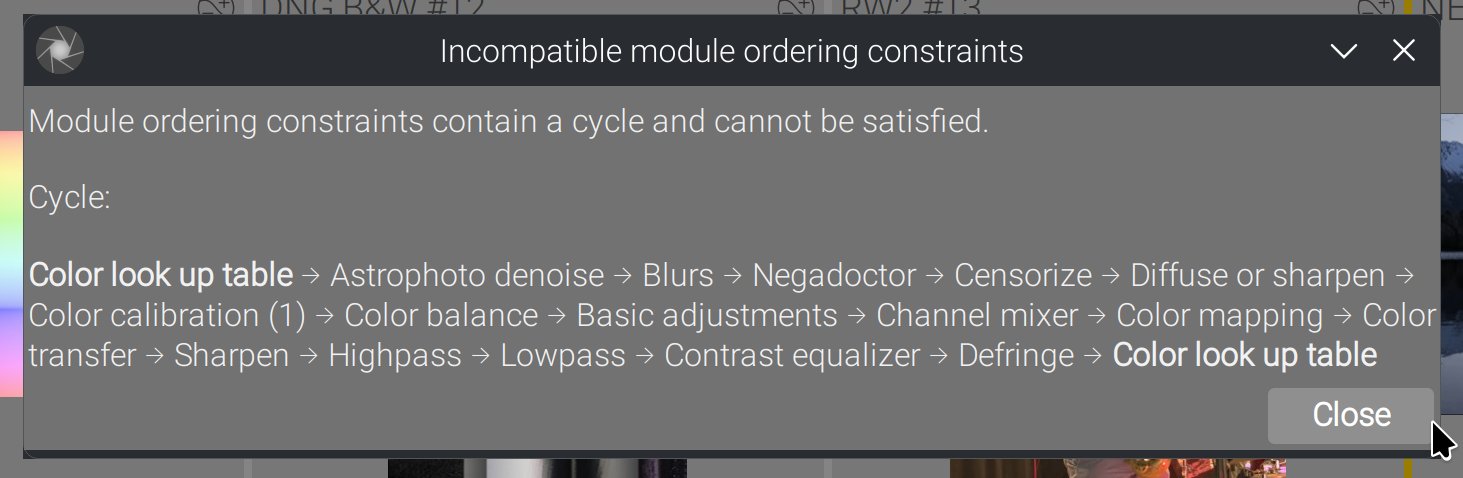
In this case, there is nothing to do : we will automatically retry by using the destination order, since it occurs typically when trying to merge source order into destination.
Forgotten raster masks
Any module that uses a raster mask should be copied along its mask-producing module, unless you plan on solving that yourself later. Just in case it’s a mistake, if you try that :
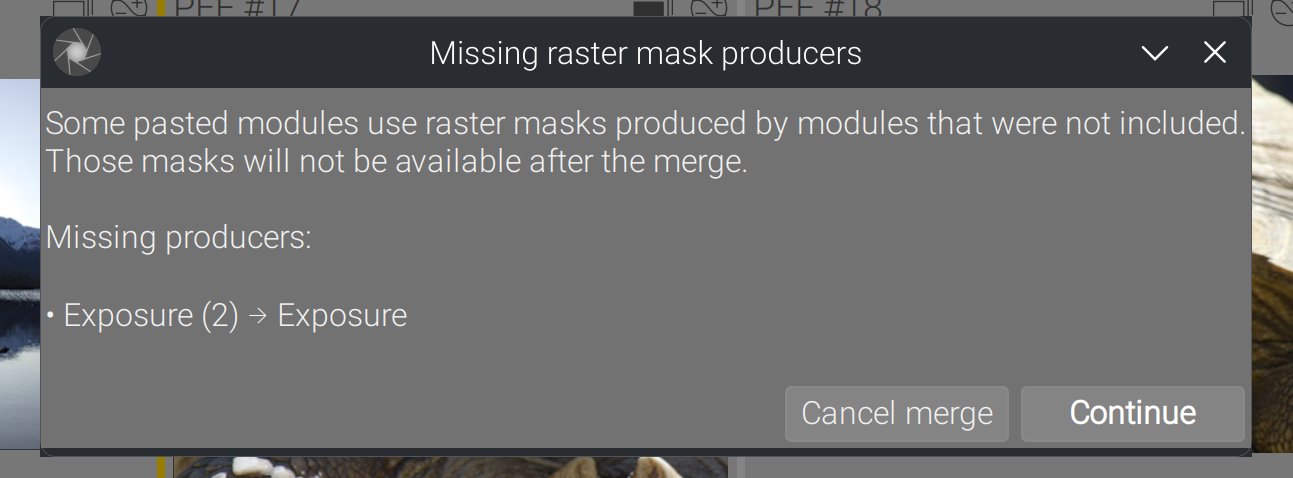
You get a chance to abort the merge right now if that was not what you wanted.
The merge report GUI (new)
Basics
The report dialog is designed to answer a simple user question: “what exactly happened to my pipeline?”
It shows four pipelines side by side:
- Original (the destination pipeline before the merge),
- Source (the image you copied from),
- Override (where source edits replaced destination edits),
- Destination (the final pipeline after the merge).
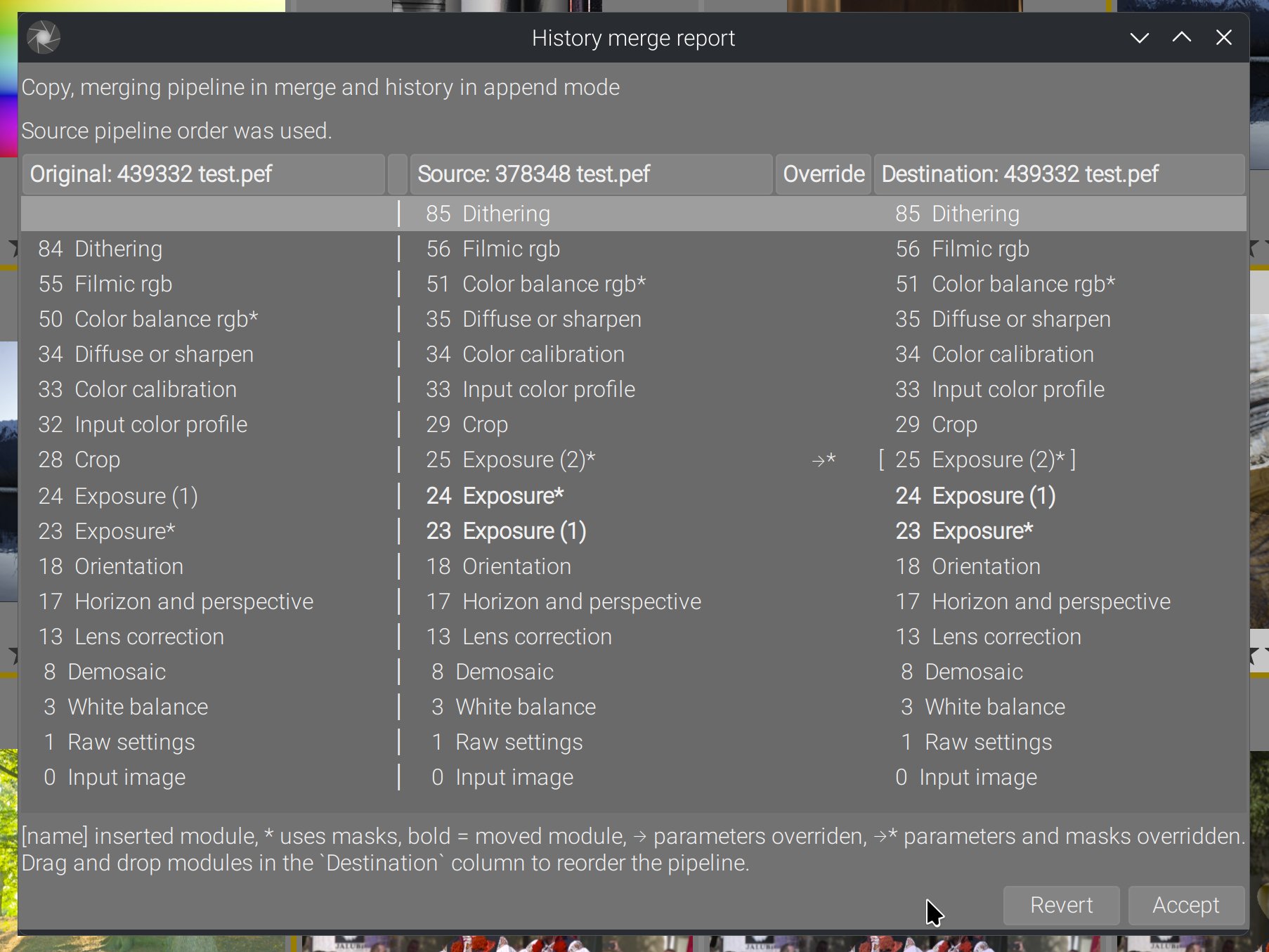
Each column lists the active module instances, in GUI order. This view includes additional markers:
- Brackets
[name]indicate modules that were newly inserted. - An asterisk
*indicates modules that use masks. - A bold label indicates modules whose relative position changed between source and destination.
- Override arrows show where the source history actually replaced destination edits (with
→*when masks were also overridden).
Candy
The destination column is reorderable with drag & drop, meaning that if you are not happy with the result of the topological sorting, you can fix it yourself right now, before it’s even saved to your database and XMP, and without having to open darkroom. This lets you adjust the final pipeline manually before accepting it, or revert everything and don’t write back the history.
When you reorder:
- the pipeline order is updated immediately,
- history entries are kept consistent with the new order,
- and the report view updates its labels and “moved” markers accordingly.
This is meant as a safety valve: even if the computed order is valid, you still have a simple way to tune it.
Why this matters
This directly improves workflows that involve batch editing with complex pipelines :
- copying edits between images,
- mixing RAW and JPEG sources/destinations,
- and heavy multi‑instance or mask‑based edits.
The goal is to make history paste predictable, even when the underlying pipelines differ. That reliability is especially important for advanced edits where small ordering differences can change results.
This change doesn’t add flashy new features — it makes one of the most used features trustworthy. History merges now behave like users expect: consistent results, clear reporting, and safe fallbacks when constraints conflict.
And I don’t understand why, 6 years after, the It Works For Me® guys crashing Darktable in slow motion didn’t consider improving such a basic yet critical feature. If that doesn’t scream wrong priorities, I don’t know what will.
What made it possible
I want to stress here that this whole rewrite was made possible because I almost entirely rewrote the history handling backend in Ansel first, since it was a mess:
- There were duplicated functions everywhere, that performed the same operation many times but hidden in calling/caller functions all over the software, some inducing filesystem I/O (XMP writing) for no reason, one writing back the history everytime we opened the darkroom (which screwed the last change timestamp),
- There were several interleaved thread locks that basically made any change impossible without deadlocking things,
- There were SQLite3 history-fetching code entangled within C code, many duplicated SQL queries, none of them thread-safe (because SQLite3 itself is not thread-safe), so I buried all the SQL code inside a C interface that handles thread safety centrally, and now all the C code fetches history info from the library database with a single API, meaning we know that everything that reads history will read it the same everywhere in the app,
- Some parts of the history reading, initialization and merging were done in SQL (leveraging
JOINstatements, which makes sense, but…), and some others were done in C (because modules safety checks and presets initialization is obviously C). That led to stupid things like manually re-indexing history items in C before saving to database in-between transient writes (because SQLite3 doesn’t guarantee the history items will be saved in database in the same order they were passed… that’s what primary keys are for). So I rewrote the whole thing in C, which may be slightly slower but ensures data consistency: histories are handled exactly the same way, whether we load them to merge them, we open the darkroom or export an image. If there is a bug somewhere, it will be everywhere and we will find it sooner, plus we will fix it in only one place. - The history management code was entangled too with GUI code, but it can run also from the
ansel-cli(without GUI), so that led to many heuristics checking if we had a GUI or not, in many places.
So, once all that janitorial work had been done, then I started to see the structure of what was actually done and needed to be done. From there, one simplification led to another, until ChatGPT 5.2 Codex did the rest. Before 2 weeks ago, that was still done entirely manually and drove me crazy many times. It’s really just paint that held those walls, flaked paint, and trying to clean it up destroyed many things because nothing in this software was modular (aka enclosed). Something you change in one place has unexpected consequences elsewhere, which is why we have encapsulation, modularity and design patterns, because the C programming language was not designed for complex desktop applications like that, and it really needs developer’s discipline to avoid becoming the nightmare it is.
This is entirely vibecoded
So the history cleanup was going on since 2023, managing burnout and software-induced depression. That’s a shitty quality of life, you have no idea. Those who think I exaggerate don’t know what it entails to shovel other people’s brain feces for more than 3 years. Because I have known a time where all that was, if not better, at least less complicated and more manageable. Until the madness of COVID-19 hit, and idiots got too much free time on their hands, that they used to destroy something that was roughly working.
And then I found out about ChatGPT 5.2 Codex 2 weeks ago, and installed it within VS Code editor. So, it took me 3 days of work to do all the stuff I presented here. Without ChatGPT, it would have been a solid 3 weeks, plus the never-ending fiddling with GTK tidbits. Let’s talk about the experience.
I disagree with those who try to make us believe GenAI is just a tool. A tool works only in my hand. Not when I sleep. I have made ChatGPT work for me while I was cooking dinner (yes, it’s that slow). You don’t communicate with a tool, you just use it to the best of your ability. In case of failure, well some blame the tool, but we all know what it means. Problem is ChatGPT doesn’t have buttons or sliders, it interpretes what you tell it, and not necessarily how you mean it. And then a tool doesn’t take initiative. Well, ChatGPT surely has an opinion on how code should look like, and sometimes you need to fight it.
GenAI is an intern. An intern has no experience and only knows what is taught in school. An intern can bring fresh new ideas that challenge your habits, and delirious suggestions just the same, that are not remotely relevant to your context and sometimes even not feasible. But an intern needs to work under close supervision and be given clear, non-ambiguous instructions. ChatGPT is much more an intern than a tool.
ChatGPT does a lot of mistakes, and they are sneaky because they are buried in the middle of perfectly valid stuff. It has some weird obsessions (like NULL-checking every pointer that we already know can’t be NULL). So, you really need to watch it. Though reviewing and fixing its mistakes is still faster than writing all the code myself, not to mention my first carpal syndrom issue was 10 years ago, so it’s always that much to not type. Plus, it does mistakes on logic, but no typos, and at least a lot less than myself.
But where ChatGPT Codex shines, is in 2 things.
First, the tedious game of greping functions across the code base to find out (reverse-engineer) the lifecycle of data and check all call sites to build a mental model of what’s going on. That takes ages, it’s very cognitively demanding, especially in a code base that shitty. ChatGPT works wonders to traverse dozens of files, extract patterns, find out what could be factorized, and follow sequences of execution. Let us be very clear that, in a well-maintained code base, that should not be a need because the code would be self-enclosed in modules, isolated from the rest. But ChatGPT helped a lot to make things more modular.
Second, everything involving GTK and GLib. Those are poorly documented on the web, and many idiomatic patterns of interaction are known only to GTK developers. ChatGPT has obviously ingested lots of open-source code and can produce much better boilerplate GUI code than I could (or care to). Anyway, before ChatGPT, that turned into tedious sessions of googling info, and I can’t find any relevant technical info on Google since 2020 or so, when they changed their algorithms to aggressively second-guess everything. But I work to solve problems, and all the GUI boilerplate functions initing widgets and their properties in a declarative style is not worthy of my intelligence, it’s only trying to not introduce typos.
But to get a better idea, here is the kind of prompts I had to give it to build what I just presented :
now, in _hm_try_merge_iop_order_topologically(), build early in the function a GHashtable of all modules IDs tied to mod_list, then to dev_src->iop, then to dev_dest->iop. These will be useful to compute intersection of sets later. don’t modify dev_dest->iop_order_list. For all item in the sorted list (item being a node ID tied to a module op and multi_name) :
- find out if a corresponding module instance exists in dev_dest->iop, if not create it. Because dev_dest->iop is already inited and sanitized upstream, we can safely assume that every module not found should be inserted as a new instance. If the module instance ID is found in the input mod_list, the whole content of the module (parameters, blendop, etc.) should be copied between the source instance to the destination instance. Mind the deep copies that need to happen.
- overwrite all module->iop_order values with the new index number we just found by solving
- rebuild dev_dest->iop_order_list from scratch and update the module->multi_priority accordingly
now, in dt_history_merge_module_list_into_image_advanced, the temp history needs to be built as follow:
- deimplement the force_new_modules path for now, we will come back to it later and differently,
- build a temporary history as follow: for each module in mod_list:
- get the associated history item from dev_src->history (that would be the last one matching this module on the history stack),
- get the pipeline ordering info (iop_order, instance, multi_priority) from the corresponding module in dev_dest->iop
- update the existing history item from dev_src->history with pipeline ordering, since it may have changed after the topological sort, from the original history item,
- add this history entry to the temporary history
- concatenate the temporary history with dev_dest->history, first or last depending of append or appstart mode.
Try to use methods from history.c and dev_history.c as much as possible for the history to/from module handling. Extend the existing ones if you only need minor changes.
No, revert that. It’s not ok to delete history entries past the history_end in general. Whatever is in dev->history should go into the DB. Also, it’s not a problem because the history_end is also saved into DB. The problem here is that random history items are added when reading back the history from DB. Everything up to writing history, which happened in C, was ok. Find out why we get extra history entries when reading back from DB, compared to what we have at writing time before.
at the end of dt_history_merge in history_merge.c , I want you to show a report popup window. A text label will first tell “Copy, merging pipeline in {MERGE_MODE} and history in {STRATEGY} mode”, where {MERGE_MODE} depends on merge_iop_order (merge or destination), and {STRATEGY} depends on strategy. Then I want a GtkTreeView in list mode, with 3 columns:
- the source of the copy, with image ID and filename (not the full path),
- the override,
- the destination of the copy, with image ID and filename.
In columns 1. and 3., each row will show the module instances, starting with their pipeline order, module->name and module->multi_name. Only enabled modules will show. The column 2 will draw an arrow between source and destination instances when the source history overrides the destination history. This is done by checking, in the destination history, if the last entry targeting this module matches destination history or source. In case it matches both, show nothing since it’s not an override. The pipeline nodes will be shown in reverse order to match GUI ordering, since it’s a kind of layer stack. They should both be aligned on the bottom so the early steps have a chance to be on the same row until topology diverges between both pipes
One thing I found out is you can definitely be too specific with ChatGPT and lead it to a wall. When that happens, the best course of action is to take over manually.
The energy cost of that thing is unbearable, but let’s say, divided be the 900-ish guys who starred Ansel on Github (I don’t have download stats), it’s for the greater good. It just a more efficient way of sparing my brain juice to think about what should be done (design and architecture), rather than how to do it. Probably not how kids vibecode these days, though.
Next: styles.
Translated from English by : ChatGPT. In case of conflict, inconsistency or error, the English version shall prevail.
